
The rise of text to video technology has reshaped how creators, marketers, and businesses approach content production. Instead of relying on complex editing software or large production teams, users can now convert simple written prompts into dynamic video sequences with minimal effort. This shift has made video creation more accessible while maintaining a level of quality that meets modern digital standards.
As demand for short-form and long-form video continues to grow across platforms, choosing the right text to video tool becomes increasingly important. Each platform offers different strengths, from cinematic visuals to rapid content generation. Below is a curated list of five notable tools, starting with Pollo AI, evaluated based on flexibility, output quality, and real-world usability.
1. Pollo AI – A Versatile Text to Video Platform for Structured Content Creation
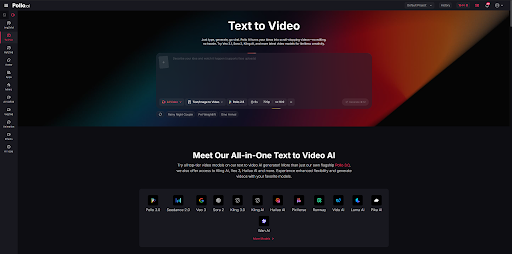
Pollo AI stands out in text to video for its ability to convert written prompts into structured, multi-scene video sequences. It is designed to handle both simple inputs and more detailed storytelling requests, making it suitable for users who want consistency across scenes. The platform focuses on maintaining visual coherence, ensuring that transitions, styles, and elements remain aligned throughout the generated video.
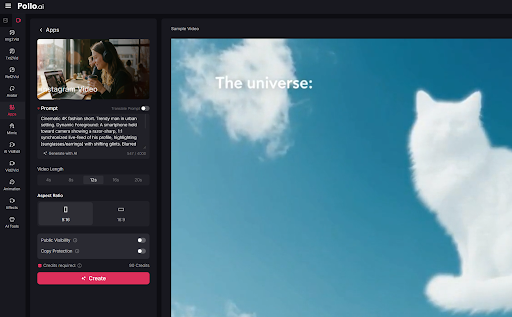
In addition, Pollo AI provides a balanced approach between automation and customization. Users can guide the narrative flow while still benefiting from AI-driven generation. This makes it particularly useful for those who want efficiency without losing creative direction. Its interface supports different aspect ratios and formats, allowing content to be adapted for various platforms without requiring additional editing steps.
It is built to streamline the process of turning text into cohesive video narratives, supporting both short-form and multi-scene outputs.
Why Recommend
The platform combines ease of use with structured storytelling, offering consistent visuals and smooth transitions across generated content.
Best Use Cases
- Create marketing videos with clear narrative flow
- Produce educational explainer videos from scripts
- Generate video content for Instagram and other social platforms, making it a practical Instagram video maker for consistent and engaging visuals
2. Kling 3.0 – Cinematic Text to Video Generation with Advanced Visual Depth
Kling 3.0 approaches text to video generation with a strong emphasis on realism and cinematic quality. It is known for producing visually rich sequences that incorporate detailed motion, lighting, and environmental effects. This makes it particularly appealing for users who prioritize visual depth and atmosphere in their videos.
Another defining aspect of Kling 3.0 is its ability to interpret descriptive prompts with a high level of nuance. It can generate scenes that feel more immersive compared to standard outputs, especially when prompts include detailed environmental or emotional cues. While it may require more precise input for optimal results, the payoff is often a more polished and visually compelling video.
It focuses on high-fidelity visuals and cinematic rendering within the text to video workflow.
Why Recommend
It delivers strong visual realism and depth, making it suitable for projects that require a more cinematic feel.
Best Use Cases
- Develop cinematic storytelling content
- Create visually rich promotional videos
- Produce concept videos with detailed environments
3. Pika AI – Fast and Efficient Text to Video for Rapid Content Production
Pika AI is designed for speed and simplicity, offering a streamlined approach to text to video generation. It enables users to quickly transform written ideas into short video clips, making it especially useful for rapid content cycles. The platform prioritizes efficiency, allowing creators to experiment with multiple variations in a short amount of time.
Despite its focus on speed, Pika AI still provides a range of customization options. Users can adjust motion styles, pacing, and visual effects to better match their intended output. This balance makes it a practical choice for those who need quick turnaround times without completely sacrificing control over the final result.
Pika AI emphasizes fast video generation while maintaining a reasonable level of creative flexibility.
Why Recommend
It enables quick production of multiple video variations, which is valuable for testing and iteration.
Best Use Cases
- Generate social media clips quickly
- Create multiple ad variations for testing
- Produce short-form video content on tight deadlines
4. Runway – Creative Text to Video with AI-Assisted Editing Capabilities
Runway is widely recognized for integrating text to video generation with a broader suite of AI-powered creative tools. It goes beyond simple prompt-based video creation by offering editing features that allow users to refine and enhance their outputs. This makes it a more comprehensive solution for creators who want both generation and post-production in one place.
The platform supports a variety of workflows, from generating initial video drafts to applying advanced effects and adjustments. Its flexibility makes it suitable for users who want more control over the creative process. While it may have a slightly steeper learning curve, it rewards users with a wider range of possibilities.
Midway through exploring these tools, some creators may look to explore text to video workflows with Runway tools as a way to combine generation and editing in a single environment. This approach highlights how integrated platforms can simplify the overall production pipeline.
It combines text to video generation with advanced editing tools for a more complete creative workflow.
Why Recommend
It offers both generation and refinement capabilities, reducing the need for multiple tools.
Best Use Cases
- Edit and enhance AI-generated videos
- Create experimental or artistic video projects
- Develop content requiring post-production adjustments
5. Seedance 2.0 – Structured Text to Video for Consistent Motion and Style
Seedance 2.0 focuses on delivering consistent motion and style across generated videos. It is designed to interpret structured prompts and translate them into coherent visual sequences. This makes it particularly useful for projects that require uniformity, such as branded content or instructional videos.
The platform also emphasizes stability in motion generation, reducing visual inconsistencies that can sometimes occur in AI-generated videos. By maintaining a steady visual style, Seedance 2.0 helps ensure that the final output aligns with the intended tone and message. It is a practical choice for users who prioritize reliability over experimentation.
It specializes in producing stable and consistent text to video outputs.
Why Recommend
It maintains uniform motion and style, which is important for professional and branded content.
Best Use Cases
- Create consistent branded video content
- Produce instructional or tutorial videos
- Generate structured multi-scene presentations
Final Thoughts
Selecting the best text to video platform depends largely on the user’s priorities. Some may value speed and efficiency, while others focus on cinematic quality or editing flexibility. Pollo AI stands out for its structured approach and adaptability, while tools like Kling 3.0 and Runway cater to more visually intensive or creative workflows.
As text to video technology continues to evolve, these tools are likely to become even more capable and accessible. Understanding their strengths and ideal use cases can help creators make informed decisions and produce content that aligns with their goals.